What is Tessolo
Workspaces, sites, pages, blocks and collections — the five words the rest of these docs assume.
Five words carry most of the product. Once these are clear, everything else is a detail.
The five nouns
Workspace
A workspace holds your sites and the people who work on them. Billing and team members belong to the workspace, not to any one site.
Most people need exactly one. Agencies sometimes make one workspace per client, so each client's team only sees their own sites.
Site
A site is one public address with its own pages, design and content. northwind.com is
a site. Its blog is not a separate site — it is pages inside the same one.
Each site gets a free address immediately. You can point your own domain at it later.
Page
A page is one address inside a site: the homepage, /about, /contact. You edit pages
in the editor.
Two special pages are shared by every other page — the header (top navigation) and the footer (bottom bar). Edit them once and every page updates.
Block
A block is one piece of a page: a heading, an image, a button, a whole section band. Pages are built by stacking blocks, and blocks nest inside each other — a Section holds a Grid, the Grid holds three Boxes, each Box holds an icon and some text.
You rarely start from an empty block. The Add panel has presets: ready-made sections like a hero, a feature grid or a pricing table, already assembled.
Collection
A collection is a table of repeating content — products, articles, case studies, team members. You define the fields once, add entries, and then any page can display them.
The alternative is copying the same card layout twelve times by hand and editing each one. Collections exist so you don't. See collections.
Nothing is live until you publish
This is the single most important thing to understand, and the source of most confusion.
Editing a page changes your draft. Drafts save automatically as you type — that is what "Saved" in the top bar means. It does not mean visitors can see it.
Pressing Publish takes a snapshot of every page and puts that snapshot on the live address. Until you do, the live site keeps showing the previous snapshot.
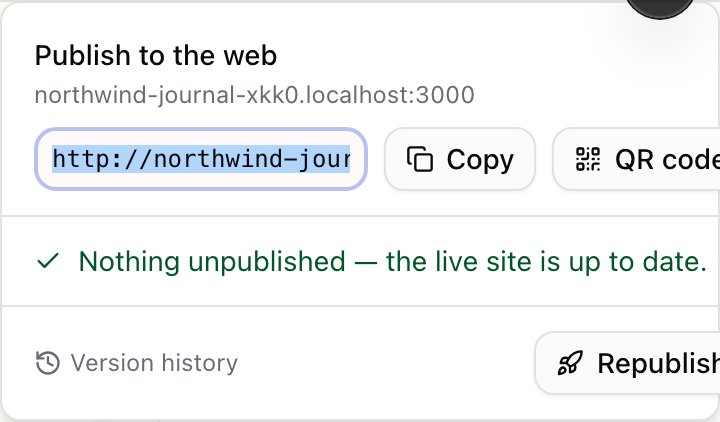
Collection entries publish separately. Republishing the site publishes your pages. An entry you edited stays as a draft until you publish that entry, even if you republish the whole site afterwards. This trips up almost everyone once.
What publishing freezes
A publish is a snapshot, not a live link to your drafts. Several things get frozen into it at that moment:
- the content of every page, including your header and footer
- the site's design settings
- your analytics IDs and any custom code
- what your plan allows — including whether the "Made with Tessolo" badge appears
The practical consequence: changing a site setting does nothing to the live site until you publish again. If you paste a Google Analytics ID and nothing tracks, that's why.
Where content lives: pages or collections?
| Use a page | Use a collection |
|---|---|
| One-off content — About, Contact, Pricing | Repeating content — products, articles, people |
| The layout is unique to that content | Every item shares one layout |
| You'd never say "add another one of these" | You'll add more over time |
You can mix them freely. A blog homepage is a page that displays entries from a collection.
What you never have to think about
- Hosting and HTTPS. Certificates are issued and renewed automatically, including for your own domain.
- Image sizes. Upload the original; visitors get a resized, modern-format version that matches their screen.
- The technical bits search engines look for. Built from your pages and entries every time you publish.
- Mobile layouts. Blocks reflow sensibly by default. You only step in when you want something different — see desktop, tablet and phone.