Filters and sorting
Filter and sort the entries a Tessolo Collection list shows, set per block, including the language rule and what to do when a list is empty.
Both live on the block, not the collection — so two lists of the same collection can show different things.
Select a Collection list (or a bound Carousel) and look at the Data section.
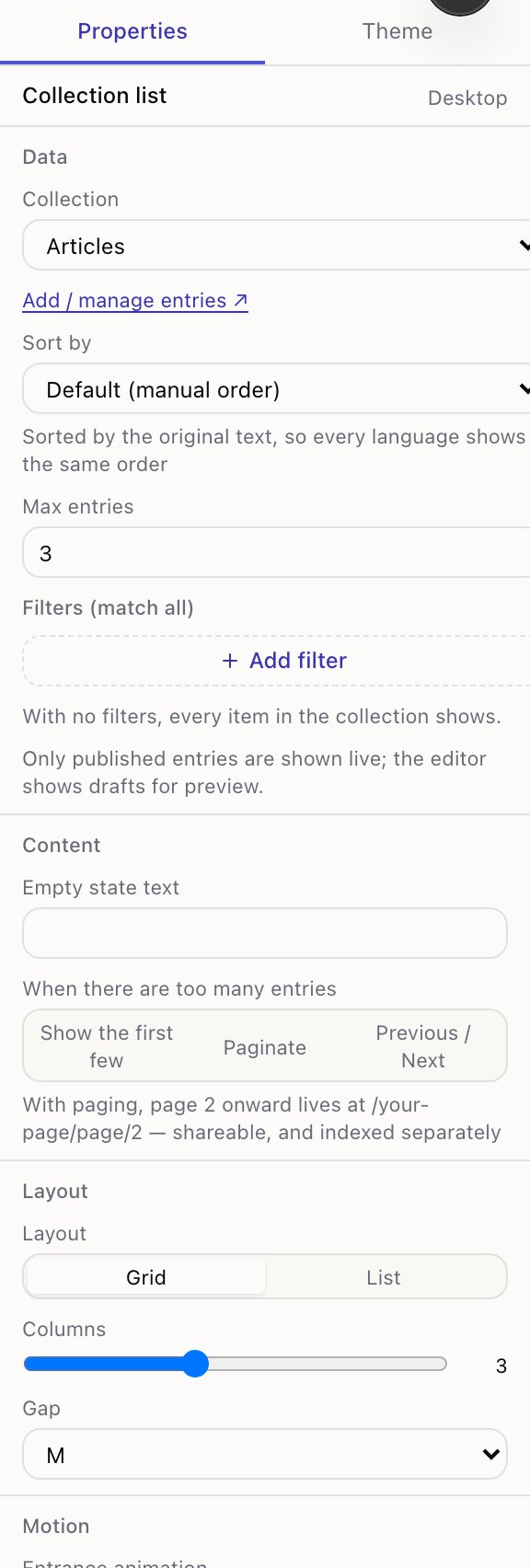
Filters
Filters (match all) — press Add filter and pick a field, an operator and a value.
| Operator | Works on | Example |
|---|---|---|
| is | anything | Featured is yes |
| is not | anything | Category is not Archive |
| contains | text | Title contains guide |
| greater than / less than | numbers | Price less than 100 |
| before / after | dates | Publish date before today |
Add up to three. An entry must match every one — that's what "match all" means. There's no "or".
Needing "or" usually means you want two lists, or a Tags field you can filter on with contains.
For a field pointing at another collection, the value is a picker showing entry names.
contains ignores capitals for English text, so guide matches Guide.
Sorting
Sort by offers every field, plus Default (manual order) — the order you set by dragging rows in the entries table.
Manual order is the right default for a small curated list: your top three products are the ones you dragged to the top. Switch to a field once the list is long enough that dragging stops being realistic — usually a date, newest first.
The language rule
Filtering and sorting always use your default language, even on a translated page. The panel says so under the sort dropdown.
Two reasons, both practical:
Pages have to line up. If /articles and /fr/articles sorted differently, page 2 of
each would hold different articles, and the link between the two language versions of a page
would point at the wrong content.
Your filter values are in one language. You typed "Featured" once. If filtering used the translated text, the French page would silently match nothing — no error, just an empty list.
When a list is empty
Work through these in order:
- Are the entries published? The editor shows drafts, the live site doesn't.
- Do the filters actually match? Remove them one at a time and watch the list.
- Is Max entries set to something small? It's easy to leave at 3 from an earlier layout.
- Is the right collection selected? With two similar collections it happens.
The block's Empty state text decides what a visitor sees when nothing matches — worth setting to something better than blank space.
Showing entries on a page
Show collection entries on a Tessolo page with the Collection list block: point it at a collection, choose a layout and set what each card shows.
Pagination
Split a long Tessolo Collection list across pages: the three behaviours, page addresses, choosing a page size, and several lists on one page.