Pagination
Split a long Tessolo Collection list across pages: the three behaviours, page addresses, choosing a page size, and several lists on one page.
On a Collection list, the Content group has When there are too many entries with three choices.
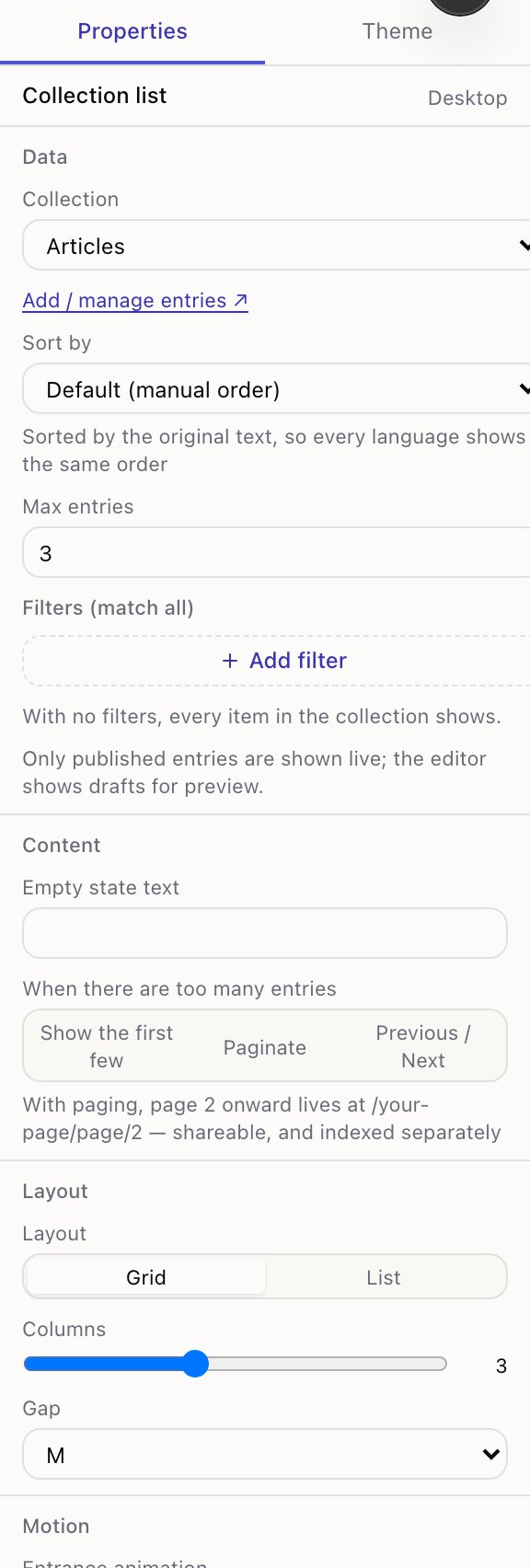
The three behaviours
Show the first few — show what fits and stop. Combine it with Max entries. Right for a homepage teaser: three latest articles and a "See all" button.
Paginate — split across numbered pages. Per page sets how many. Right for an archive someone might work through.
Previous / Next — the same split, with prev/next links instead of numbers. Tidier when there could be fifty pages.
The addresses
With paging, a list on /articles gives you:
/articles          ← page 1, always the plain address
/articles/page/2
/articles/page/3
Page one is always the address with no suffix. There's no /page/1, so the same content
never sits at two addresses — which would split its search ranking between them.
Those addresses are real: shareable, bookmarkable, and indexed separately, so someone can land directly on page three from a search. The panel says as much next to the setting.
Choosing a page size
Bigger pages mean fewer clicks; smaller pages load faster. For a card grid, pick a multiple of your column count — 3 columns × 4 rows = 12 — so no page ends with an orphan card.
More than one list on a page
If a page has two paginated lists, the page number applies to both. That's intentional: there's one address, so there's one page number. Two independent pagers would need two numbers in one address, which is confusing to read and to link.
If you need them independent, put them on separate pages.
What visitors see
Numbered pages show Page 2 of 7 with previous and next links, in your site's language. Nothing to configure.
When someone asks for a page that doesn't exist
Opening /articles/page/99 on a list with 7 pages gives a proper "not found" rather than an
empty list. An empty page that returns "everything's fine" gets indexed by search engines as
real content; a "not found" doesn't.
Filters and sorting
Filter and sort the entries a Tessolo Collection list shows, set per block, including the language rule and what to do when a list is empty.
Detail pages for entries
Give every collection entry its own page in Tessolo: create a detail template, set the address prefix, link lists to it, and SEO per entry.